LoopBack
I built LoopBack because I realized my networking system was LinkedIn tabs, memory, and anxiety.
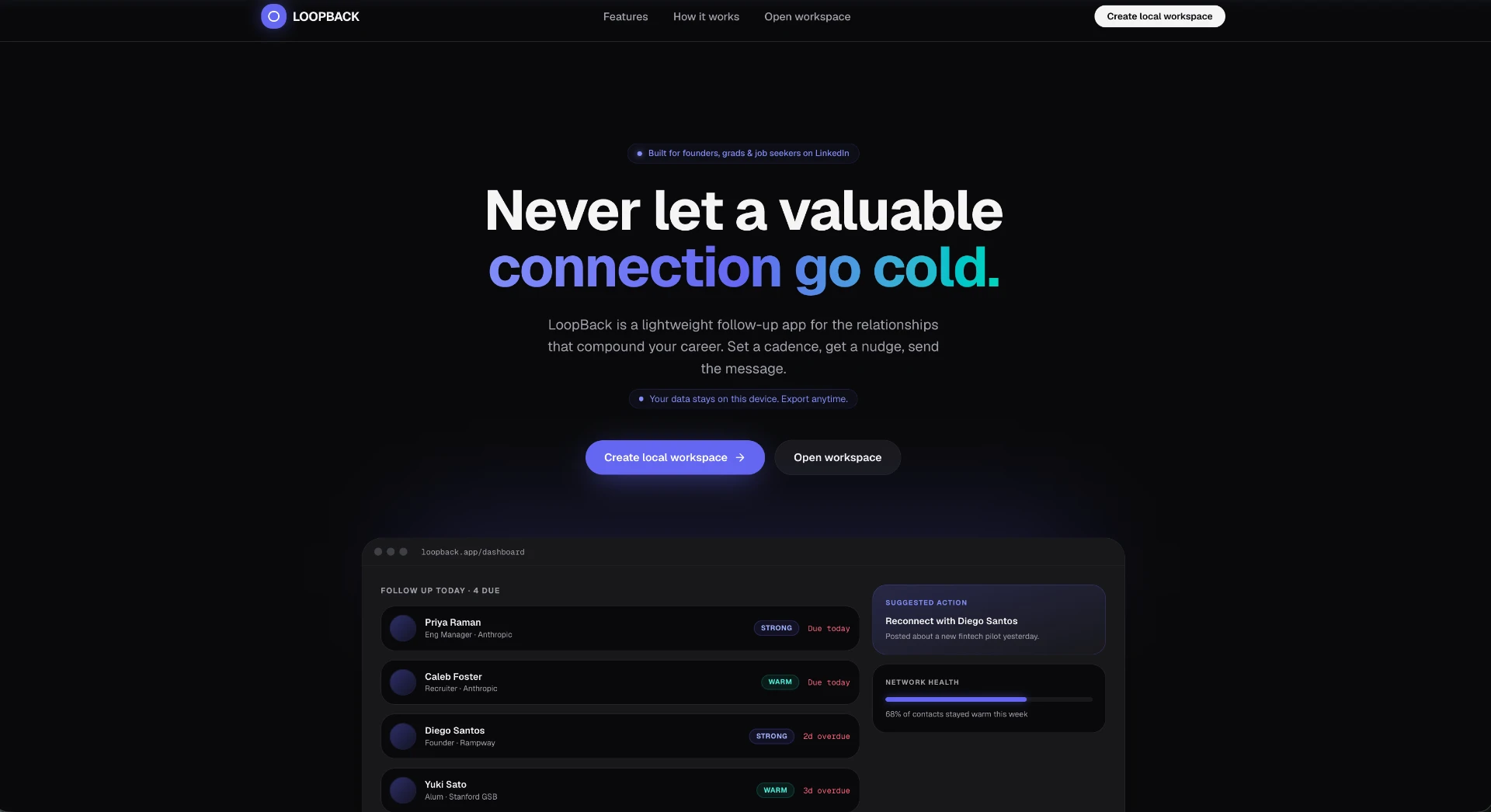
During my job search, I started talking to more people than I could properly keep track of. Founders, engineers, recruiters, alumni, friends of friends. At first, it felt manageable. Then after a few weeks, I had no idea who I was supposed to follow up with, what we talked about, or whether I was letting a good connection quietly disappear.
That is the annoying thing about networking. The hard part is not always sending the first message. Sometimes the hard part is remembering the second one.
LoopBack is a lightweight follow-up app for LinkedIn networking. You add a contact, save the context, set a cadence, and LoopBack tells you when to follow up before the connection goes cold. It also helps suggest what to do next, so you are not staring at a blank message box trying to sound normal.
The idea is simple:
Add the person.
Save the context.
Set the cadence.
Follow up before it gets awkward.
This is not meant to be Salesforce. It is not a giant CRM. It is not some automated LinkedIn spam machine. It is a small system for keeping real relationships warm.
Coding and Design
LoopBack is a frontend-heavy React app built with React, TypeScript, TanStack-style routing, Vite, Tailwind CSS, Radix UI, lucide-react, date-fns, sonner, and localStorage.
I built it as a local-first app, which means there is no real backend yet. The app stores user sessions, profile data, and contacts in the browser. That is not production security, and I would not pretend it is. But for a speed build, it was the right tradeoff. No database setup, no auth provider, no backend debugging. Just build the product loop and see if it actually works.
The app has a landing page, local login/signup, dashboard, contacts directory, queue, profile page, settings page, onboarding flow, and individual contact pages. The main shell has a sidebar, search, add-contact button, logout, and mobile navigation.
The core data model is built around contacts. Each contact has a name, role, company, LinkedIn URL, relationship type, relationship strength, last interaction, next follow-up date, cadence, notes, optional profile image, optional LinkedIn profile text, optional conversation history, and interaction history.
The main logic lives in two local stores. The auth store handles local users and sessions. The contacts store handles adding, updating, deleting, snoozing, marking done, logging interactions, importing, exporting, and calculating who is due for follow-up.
The most interesting part was the LinkedIn parsing. I wanted users to be able to paste messy LinkedIn profile text or conversation history and have LoopBack turn it into something structured. The parser tries to extract names, roles, companies, URLs, relationship types, and useful context from copied LinkedIn pages. I also added cleaners to strip out random LinkedIn noise like navigation text, reactions, duplicated labels, footer junk, and profile overlay text.
I also built a rules-based conversation analyzer. It looks at the pasted conversation and tries to infer the relationship state. Are you waiting on them? Are they waiting on you? Do you need to say thank you? Was a referral submitted? Did the conversation go stale? Should you keep the person warm?
Based on that, LoopBack shows a suggested next step, relationship strength, cadence, reasoning, and a draft message.
The design goal was to make the app feel like a clean networking command center, not a spreadsheet. Dark mode, compact cards, warm/cold/strong badges, clear follow-up queues, and contact pages that tell you what to do next without making you think too hard.
One annoying bug ended up being useful. I realized pasted profile pictures were being saved as full base64 images inside localStorage, and copied LinkedIn profiles can be huge. Once storage filled up, the app looked like it saved contacts, but after reload, some contacts disappeared because the browser never actually saved the latest version. I fixed that by compressing images, cleaning pasted text before storage, adding storage error handling, and creating a fallback that removes oversized blobs if needed.
That was a good reminder that even a small app becomes real the moment user data is involved.
Why This Was a Successful Speed Build
LoopBack worked as a speed build because the problem was specific, personal, and easy to test.
I was already networking. I was already forgetting follow-ups. I was already feeling the pain of having too many LinkedIn conversations scattered everywhere. That made the MVP obvious.
I did not need to build a giant CRM. I did not need to automate LinkedIn. I did not need a complex backend. I just needed a small tool that answered one question:
Who should I follow up with next?
That is why this speed build worked. The product had a clear enemy: forgotten follow-ups. It had a clear loop: add contact, save context, set cadence, follow up. And it had a clear user: someone trying to build relationships without turning their life into a messy spreadsheet.
The first version is not perfect. LocalStorage has limits. Local auth is not real production auth. There is no cloud sync yet. But that is fine. The point of a speed build is not to build the final company in one weekend. The point is to take an annoying problem, build the smallest useful version, and ship it before the idea dies in your notes app.
LoopBack started as a tool for my own job search and startup networking.
Now it is a live beta.
Never let a valuable connection go cold.
Live beta: https://loop-back-rho.vercel.app/
 A blog post written by Shreyas Shukla
The Stoic Stack, in your inbox.
Get notified when I drop a new post. Software, AI, sports, philosophy, and life — unsubscribe anytime.
More Blogs Like This
I Ranked 24 Self-Help Techniques So You Don't Have To
I made a tier list of self-help techniques — 24 ranked from F to S. Read it to save time by only trying the ones actually worth it.
Has AI Ruined Networking?
Using AI for networking — slop or smart? My honest take on speed, clarity, and where the line really is.
Building Solo
When you're building a project solo, it's not the cakewalk it seems. Freedom is great until accountability disappears-and pressure is what actually makes you perform.